
OBDII Car Diagnostics1.2 - App Store
You'll be able to see results in few seconds.
Publisher Description
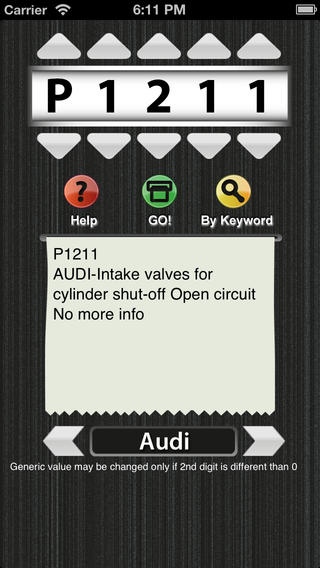
Updated version with hundreds of new codes
- Acura
- Audi
- BMW
- Chrysler (Dodge, Jeep)
- Ford (Mercury, Lincoln)
- GM (Buick, Cadillac, Chevrolet, Pontiac, Saturn)
- Honda
- Hyundai
- Infiniti
- Isuzu
- Jaguar
- Kia
- Land Rover
- Lexus
- Mazda
- Mitsubishi
- Nissan
- Subaru
- Toyota
- Volkswagen
Whether you are a mechanic or a car enthusiast, if you have or not an OBDII Scan Tool this is the perfect companion. This tool provides all you have been looking for about car diagnostics information:
- All SAE generic codes (DTC's) definition.
- B, C, P and U codes.
- Main Car Manufacturers codes definition (20 Companies plus all sub brands).
- Explanation and Repair Information for the most common trouble codes.
- Search by keyword and explore the possible codes affecting your vehicle
- The database is included on the App, so you don't need internet connection every time you use OBDII Car Diagnostics, making it faster and easier to carry on.
OBDII stands for "On Board Diagnostics II" and corresponds to a diagnostic system present on 1996 and later car models. Using a non expensive OBDII Scan tool you can read the trouble codes sent by your vehicle (formally named DTC-Diagnostic Trouble Code).
OBDII Car Diagnostics will help you translate this code and more than that, it includes repair info for the most common trouble codes.
In order to read DTC codes from your car you will need a scanner tool, it is available at any auto parts store, prices start below 50 USD
This tool is perfect for you who are interested in properly mantaining your vehicle.
Requires iOS 4.3 or later. Compatible with iPhone, iPad, and iPod touch.
About OBDII Car Diagnostics
The company that develops OBDII Car Diagnostics is Omar Artalejo. The latest version released by its developer is 1.2.
To install OBDII Car Diagnostics on your iOS device, just click the green Continue To App button above to start the installation process. The app is listed on our website since 2011-02-16 and was downloaded 0 times. We have already checked if the download link is safe, however for your own protection we recommend that you scan the downloaded app with your antivirus. Your antivirus may detect the OBDII Car Diagnostics as malware if the download link is broken.
How to install OBDII Car Diagnostics on your iOS device:
- Click on the Continue To App button on our website. This will redirect you to the App Store.
- Once the OBDII Car Diagnostics is shown in the iTunes listing of your iOS device, you can start its download and installation. Tap on the GET button to the right of the app to start downloading it.
- If you are not logged-in the iOS appstore app, you'll be prompted for your your Apple ID and/or password.
- After OBDII Car Diagnostics is downloaded, you'll see an INSTALL button to the right. Tap on it to start the actual installation of the iOS app.
- Once installation is finished you can tap on the OPEN button to start it. Its icon will also be added to your device home screen.
Program Details
System requirements
Download information
Pricing
Version History
version 1.2
posted on 2011-02-16
Disclaimer
Official App Store Link
We do not host OBDII Car Diagnostics on our servers. We did not scan it for viruses, adware, spyware or other type of malware. This app is hosted by Apple and passed their terms and conditions to be listed there. We recommend caution when installing it.
The App Store link for OBDII Car Diagnostics is provided to you by apps112.com without any warranties, representations or guarantees of any kind, so access it at your own risk.
If you have questions regarding this particular app contact the publisher directly. For questions about the functionalities of apps112.com contact us.
